Explore the equipment catalogue

Showing the first 40. Add a model name to narrow your search.

ECS-48S · Perth installation

UniFi Switch Enterprise Campus 48S
Installation Perth.

Plan your UniFi Switch Enterprise Campus 48S installation in Perth with Servicewest. We assess the site and supporting equipment before specifying ECS-48S.

  • Port count and link speed
  • Uplink and transceiver compatibility
  • Endpoint power arrangements
Request a site assessment Australian model, compatibility and procurement checked before the scope is confirmed.

Installing Switch Enterprise Campus 48S. Start with the site.

Put Switch Enterprise Campus 48S in the right part of the network.

We scope ECS-48S around the number and type of devices it will connect. Port speeds and uplinks need to match the equipment at both ends. A switch selected for cameras can have different requirements from one serving high-speed access points, workstations or another cabinet.

Installation details for ECS-48S

Power Method: (2) Universal input, 100–240V AC, 50/60 Hz. Max. Power Consumption: 250W. Dimensions: 442.4 x 44 x 496 mm (17.4 x 1.7 x 19.5"). Ambient Operating Temperature: -5 to 40° C (23 to 104° F). These manufacturer figures inform the mounting, connection and site assessment; we check the final model and supporting equipment before installation.

Check the links and supporting equipment.

We check port media, uplink capacity and any transceivers or adapters required. Devices that need PoE may require a separate compatible source. We confirm this in the equipment list rather than assuming every Ethernet port supplies power.

Install for future servicing.

The work includes the agreed mounting, patching, labels and UniFi adoption. We confirm the switch management network and any VLAN or uplink settings with the system owner, then test the connected devices. Rack airflow and access remain part of the physical layout.

Know the
equipment.

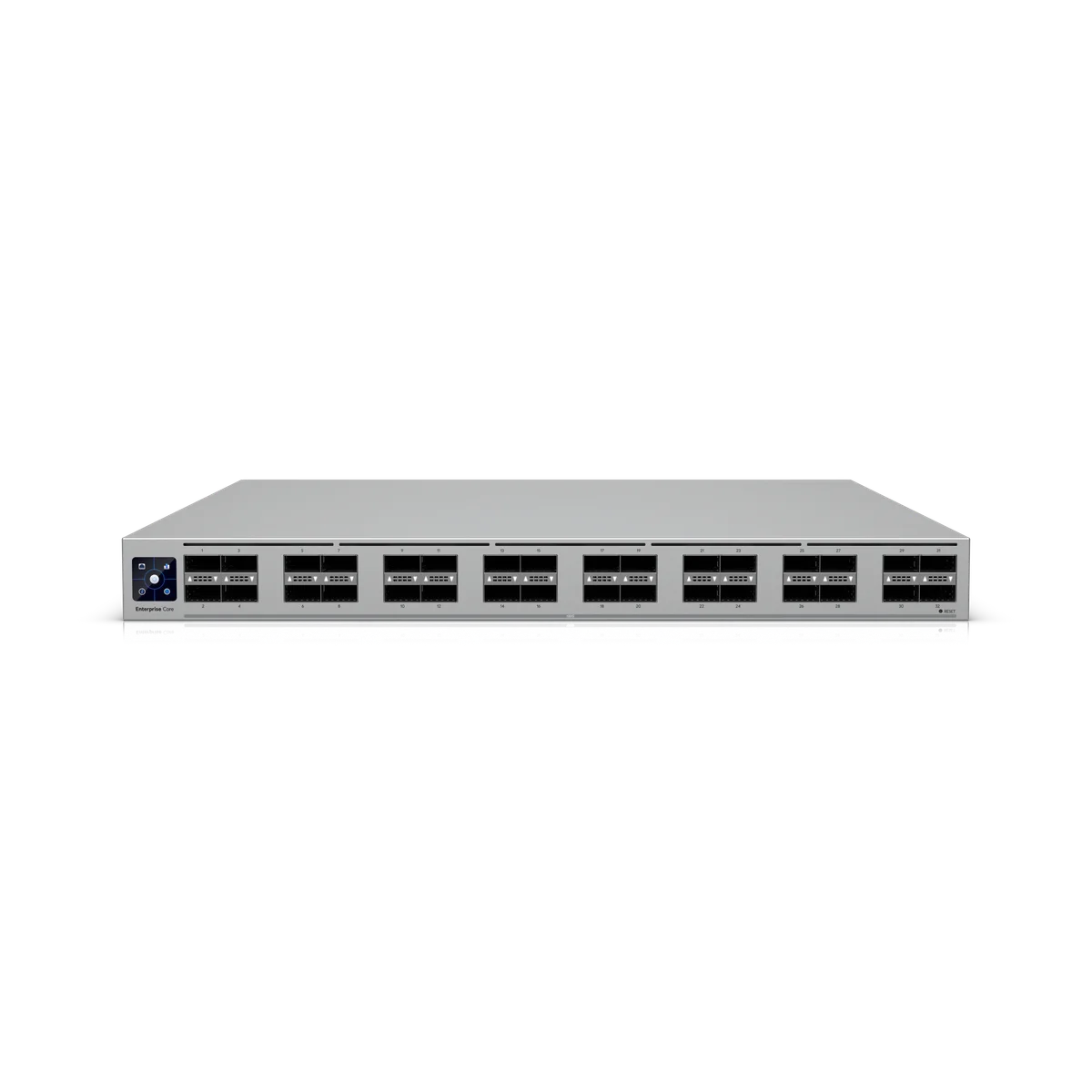
Manufacturer specifications for ECS-48S. Check the selected model, regional version and current software requirements during assessment.

View manufacturer source
Overview
Dimensions442.4 x 44 x 496 mm (17.4 x 1.7 x 19.5")
1 GbE RJ451 (1G/100M/10M)OOB Management port only
2.5 GbE RJ4532 (2.5G/1G/100M/10M)10/100M half-duplex not supported
10 GbE RJ4516 (10G/5G/2.5G/1G/100M/10M)10/100M half-duplex not supported
25G SFP284 (25G/10G/1G)
100G QSFP282 (100G)Stacking port only, does not support uplink. Breakout cables are not supported
Console1
RedundancySwitch Stacking (2) Hot-Swappable PSUs (4) Hot-Swappable Fans
Form FactorRack Mount (1U, Full-Depth)Requires a 4-post rack, or a center-mount bracket or cantilever shelf on 2-post racks for optimal support
Performance
Switching Capacity680 Gbps
Total Non-Blocking Throughput340 Gbps
Forwarding Rate506 Mpps
Supported VLANs1,000
MAC Address Table Size32,000
IPv4 Static Routes512
Packet Buffer Size8 MB
IPv4256
MAC256
Hardware
Max. Power Consumption250W
Power Method(2) Universal input, 100–240V AC, 50/60 Hz
Power Input Method(2) AC input, Hot-swappable power modules
Power Supply(2) Hot-swappable AC/DC 550W power modules
Supported Voltage Range100–240V AC
ManagementEthernet OOB Management port Serial Console AR
Heat Dissipation853 BTU/hr
WeightWithout mounting brackets: 10.2 kg (22.5 lb) With mounting brackets: 10.3 kg (22.7 lb)
Enclosure MaterialSGCC steel
Mount MaterialSGCC steel
Supported Rack Depth482.6 mm (19") four-post racks Posts depths ranging from 650 to 1,000 mm (25.6–39.4”)
LCM Display1.3" touchscreen
Fan Method(4) Hot-swappable fan modulesFan modules operate with 3 + 1 redundancy
ESD ProtectionAir: ± 12kV, contact: ± 8kV
Ambient Operating Temperature-5 to 40° C (23 to 104° F)
Ambient Operating Humidity10 to 90% noncondensing
CertificationsCE, FCC, IC
Software
UniFi NetworkVersion 10.6.101 and later

Plan the supporting equipment. Check the complete system.

Related catalogue items to discuss. Compatibility is checked against the exact model and site design.

A few practical questions.

Can you assess Switch Enterprise Campus 48S for an existing system?
Yes. Include ECS-48S, your existing console or host equipment, and a brief description of the work in your enquiry. We check compatibility, capacity and site access before confirming the installation scope.
What should I send for a Switch Enterprise Campus 48S assessment?
Send your suburb, property type, the intended location and any existing equipment model numbers. Port count and link speed and uplink and transceiver compatibility are useful starting points. Photographs of the proposed location can help with the initial discussion.
Does this page confirm Australian stock or a fixed installation price?
No. This catalogue uses manufacturer product references. We confirm the suitable Australian model, procurement options and a site-specific scope before quoting.

Keep planning.

Let’s look at your site.

Good installations
start with a conversation.

Tell us your suburb, your property and what you want to connect. We’ll work through the equipment and the installation with you.